Running Obsidian on a headless server
Since writing this post, the wonderful people over at Obsidian have released a fully fledged headless client 🥳 So in the spirit of this, you can fully disregard the rest of the post, and just follow their instructions. However, let me tell you how I set this up myself, if you wish to remain here.
First off, ensure you have both node and npm installed. As this is a requirement to installing the package. Then, let’s go ahead and install the package:
sudo npm install -g obsidian-headlessJust a note, I am running this on Arch Linux, and I need to use sudo in order to be able to install it globally. First thing you need to do is login:
ob loginEnter your username and password (And MFA if setup) and you should be good to go. Now to configure the location of the vault:
mkdir ~/vaults #or wherever
# Show your remote vaults, this will get you a VAULT_NAME
ob sync-list-remote
# IMPORTANT, move into the directoru where you want to store it
cd ~/vaults
ob sync-setup --vault "VAULT_NAME"
Now to run a one time sync, just run ob sync. Boom that’s it! 👏 Well sort of. You would need to do this all the time. Their docs do suggest running ob sync --continuous as that will watch for changes. But the problem is, if you are running this on a remote system (like me) it will be shut down once I exit the sessions.
So… Let’s set up a systemd service! Create a file at this location: ~/.config/systemd/user/obsidian-sync.service with the following content:
[Unit]
Description=Obsidian Headless Sync
After=network.target

[Service]
ExecStart=/usr/bin/ob sync --continuous
WorkingDirectory=%h/vaults
Restart=on-failure

[Install]
WantedBy=default.target
Then just enable and start the service:
systemctl --user enable --now obsidian-syncTo check the status, you can also run:
systemctl --user status obsidian-syncThat’s it! WAY simpler than emulating x11 and using ssh x11 forwarding. Thank you Obsidian team! I will leave the rest of the blog post in tact, for legacy reasons. But you do not need to follow anything below this line from now on huzzah! 👏

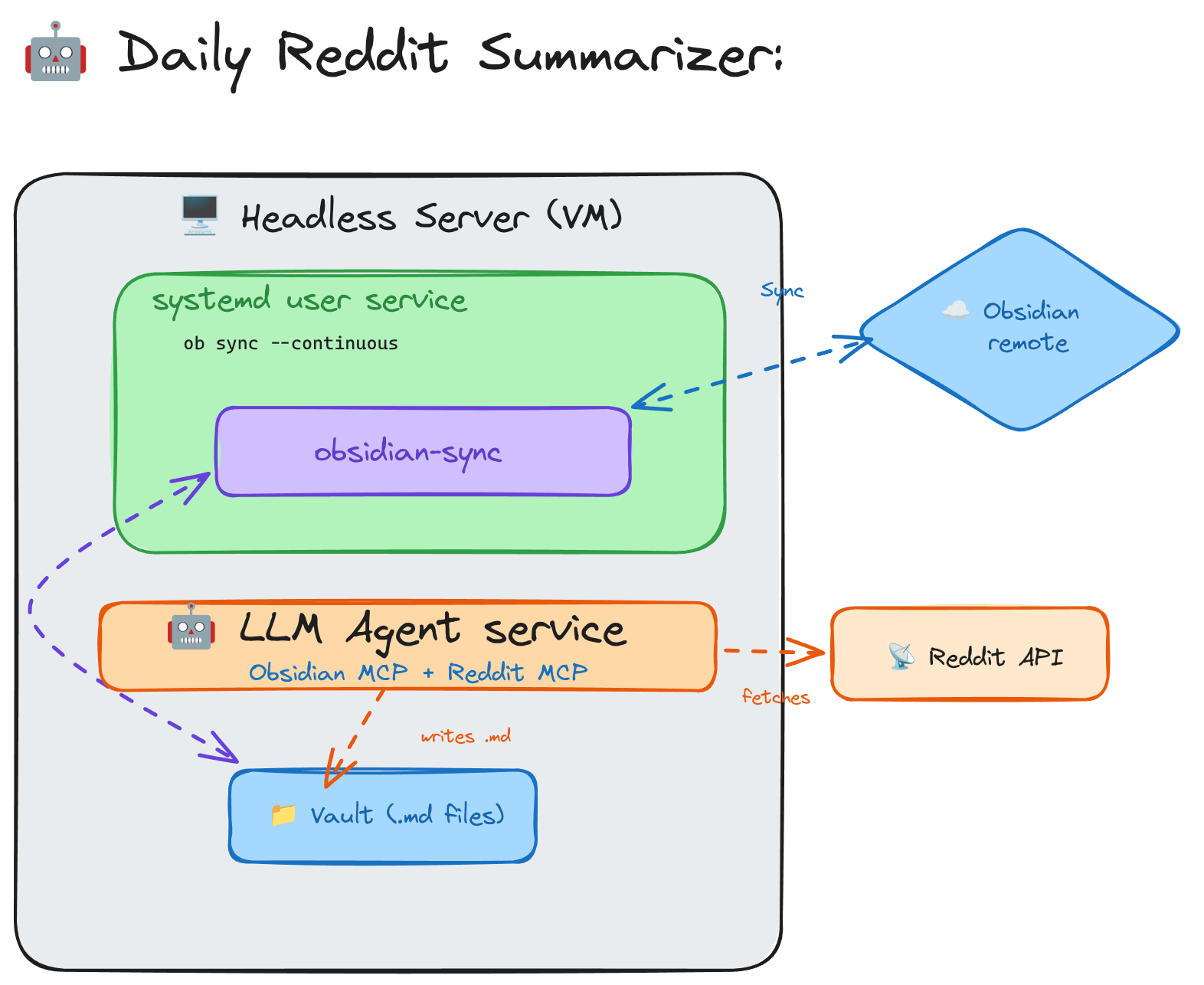
These days we are all (trying to use) using Agents! Right? From helping you with your day-to-day coding, to managing social media research, to even helping you plan out your days. Some of us use coding assistants, some of us web interfaces, but there is a number of us that want to build bespoke agents that run on our own little pieces of the internet. Well, I wanted to build one that would do some daily research on certain subreddits and write down its findings inside of my Obsidian notes. What could go wrong!
First off, Obsidian is an excellent note taking tool that I use extensively for all my personal notes. Projects I build, tasks I need to do. For a small fee it will even sync up my notes across multiple devices. Definitely the best money ever spent. Now I wanted to give my agent access to these notes. (side note: The notes are just locally stored markdown files, nothing fancier than that)
But there was a catch. I wanted to run this in my home lab, on a virtual machine. So… What’s the catch? Well, to run Obsidian and have it start syncing there are a few steps:
Hmm, so step number 2 is the problem. I cannot open Obsidian as I have no GUI running on this headless server. I can certainly install it but once I try to start it:
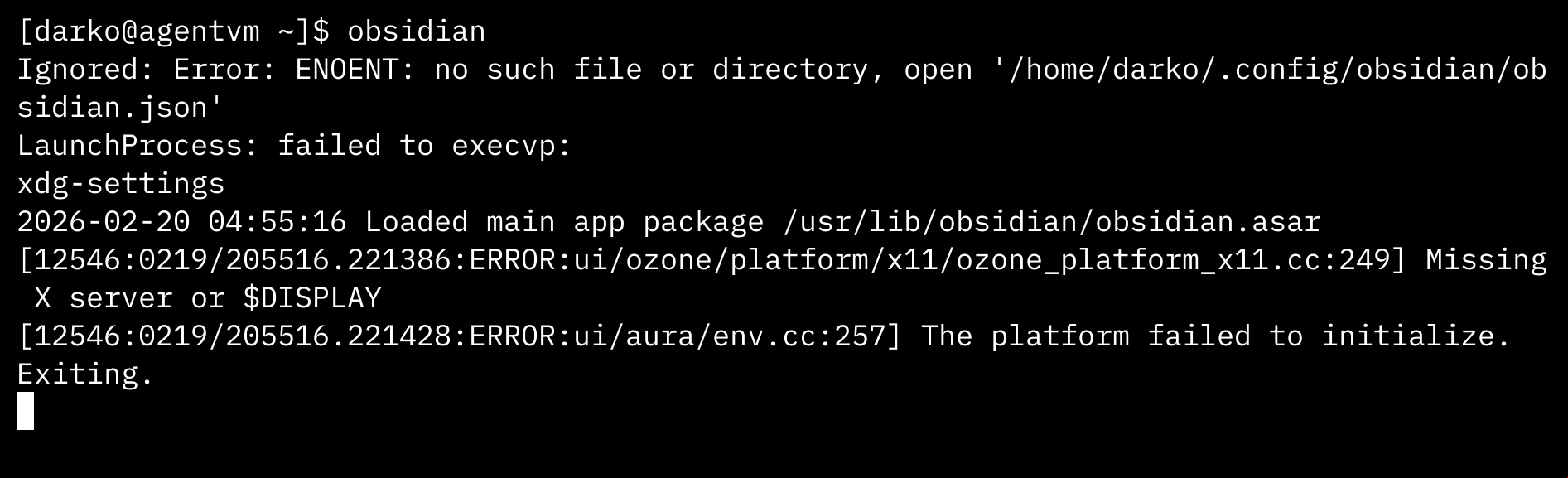
I am missing that GUI/x11 here. But I really don’t want x11 running on this server. So how can I start Obsidian to do my login bit?
NOTE: I run Arch Linux (btw), because I feel very comfortable with it. Your mileage may vary with other distros.
Ah, the tried and true X11 forwarding. The ability to have a “remote desktop” purely via SSH. In essence it enables a local X11 client (my Linux laptop) to execute remote X11 applications running on my server. Even though the server does not have any X11 software installed, nor it has a X Server running.
Cathode Ray Dude, has an excellent video adjacent this topic. I do recommend you check it out.
So with X11 forwarding I will be able to start Obsidian for the first time and set up sync. Let’s do this. To get this started you need to do two things:
xauth on your server (unless it already has it)X11Forwarding yes in your /etc/ssh/sshd_config file (on the server)The xauth package does not come as standard on Arch Linux. So I have to install it otherwise the server cannot generate X11 Authentication cookies, and I kept geting some cryptic errors alluding to this. Depending on what OS you are running for your server, you may not need to install this.
Restart the SSH server, and run the following:
# replace your username and server with the correct values
ssh -X user@server obsidian
Boom 💥 - Look at that!
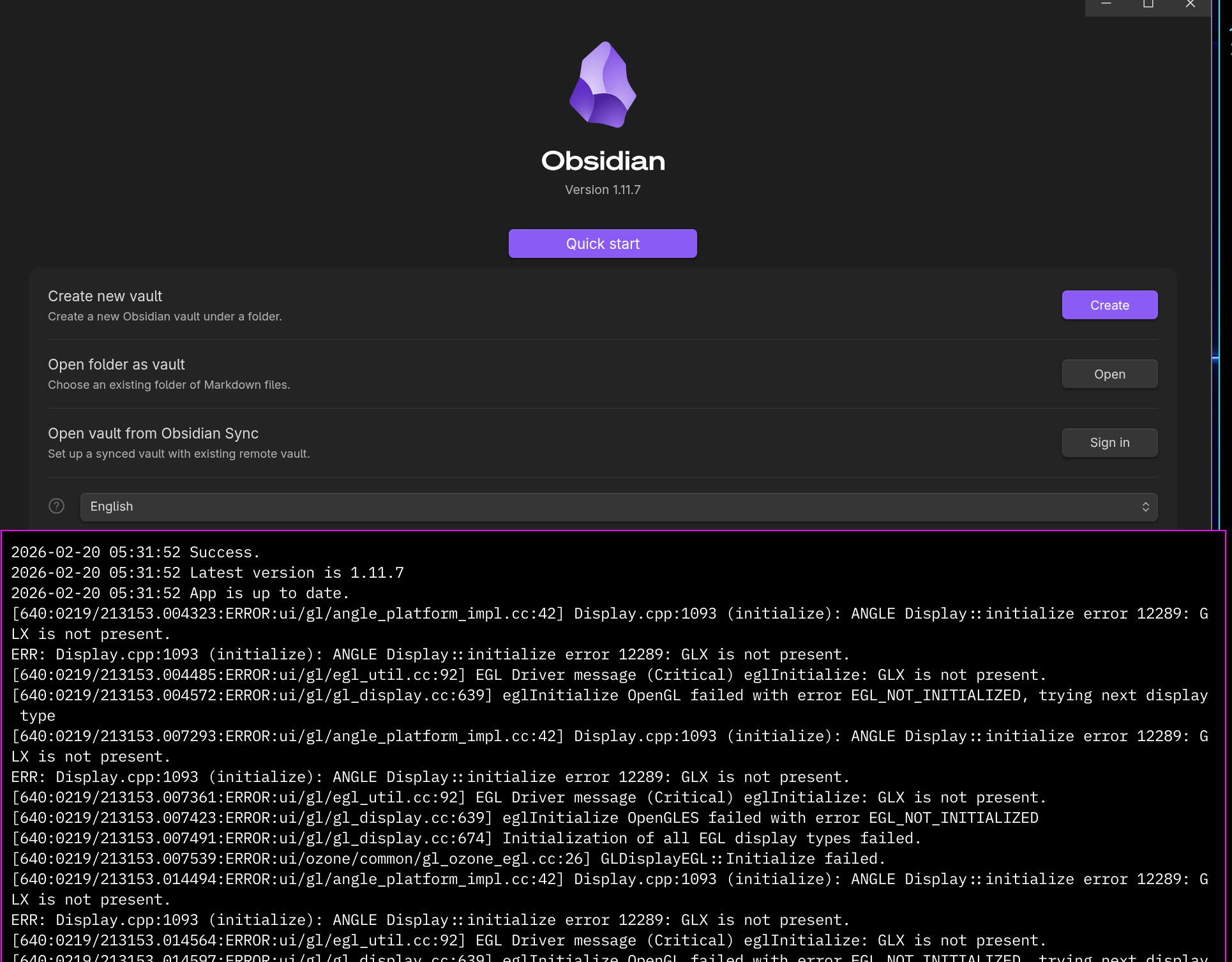
Okay, now log in, set your vault. And you are good to go. Oh and if you are a paid customer, and have the catalyst licence you should also enable the Command Line version of Obsidian. Just in case.
We are almost, good to go. Except, one more problem. I don’t want Obsidian just running like this, via SSH and X11 forwarding. I want it running truly headless, meaning I just run obsidian at startup and let it be. Well for that, let’s talk about faking X11.
Enter Xvfb: a virtual frame buffer, basically a fake X server in memory. Whats great about this tool is that does not require my server to have any sort of display adapter (even though mine has), and it also shows no display at all. The applications themselves just thing this is your normal X Server and keep humming along.
By installing and running this, I am able to just kick off Obsidian and not worry.
To get this going, first install the xorg-server-xvfb (or your distro alternative). Now try to test it manually to see if it works:
xvfb-run --auto-servernum obsidian --no-sandboxThis may net you something like this in the console:
[darko@agentvm ~]$ xvfb-run --auto-servernum obsidian --no-sandbox
Ignored: Error: ENOENT: no such file or directory, open '/home/darko/.config/obsidian/obsidian.json'
LaunchProcess: failed to execvp:
xdg-settings
2026-02-20 06:09:08 Loaded main app package /usr/lib/obsidian/obsidian.asar
2026-02-20 06:09:08 Checking for update using Github
[959:0219/220908.705898:ERROR:components/viz/service/main/viz_main_impl.cc:189] Exiting GPU process due to errors during initialization
2026-02-20 06:09:08 Success.
2026-02-20 06:09:08 Latest version is 1.11.7
2026-02-20 06:09:08 App is up to date.
And ps should now show us that obsidian is running:
[darko@agentvm ~]$ ps ax | grep obsidian
    913 pts/0    S+     0:00 /bin/sh /usr/bin/xvfb-run --auto-servernum obsidian --no-sandbox
    928 pts/0    Sl+    0:00 /usr/lib/electron39/electron /usr/lib/obsidian/app.asar --no-sandbox
[...]
The
--no-sandboxflag is used because of the dreaded electron framework. It’s security sandboxing does not really play nice with some server environment, so I had to use this flag to make it work.
To further test it, update a file somewhere where you have Obsidian running, and just cat that markdown file on the server to see if the file has been updated! Huzzah! 👏
Lastly, to make this more permanent, let’s set up a local service to run this. Since we are running this under my user (and my own vault), this will be a user systemd service.
# Create systemd user service
mkdir -p ~/.config/systemd/user
cat > ~/.config/systemd/user/obsidian.service << 'EOF'
[Unit]
Description=Obsidian (headless via Xvfb)
After=network-online.target
Wants=network-online.target

[Service]
Type=simple
ExecStart=xvfb-run --auto-servernum obsidian --no-sandbox
Restart=on-failure
RestartSec=10

[Install]
WantedBy=default.target
EOF

# Enable and start
systemctl --user daemon-reload
systemctl --user enable --now obsidian.service
VERY IMPORTANT: To keep the user services running after we have closed our SSH sessions, you need to enable-linger for your user. To do this just run:
# loginctl should be part of your systemd system
sudo loginctl enable-linger $USER
Okay, let’s verify the service with:
systemctl --user status obsidian.service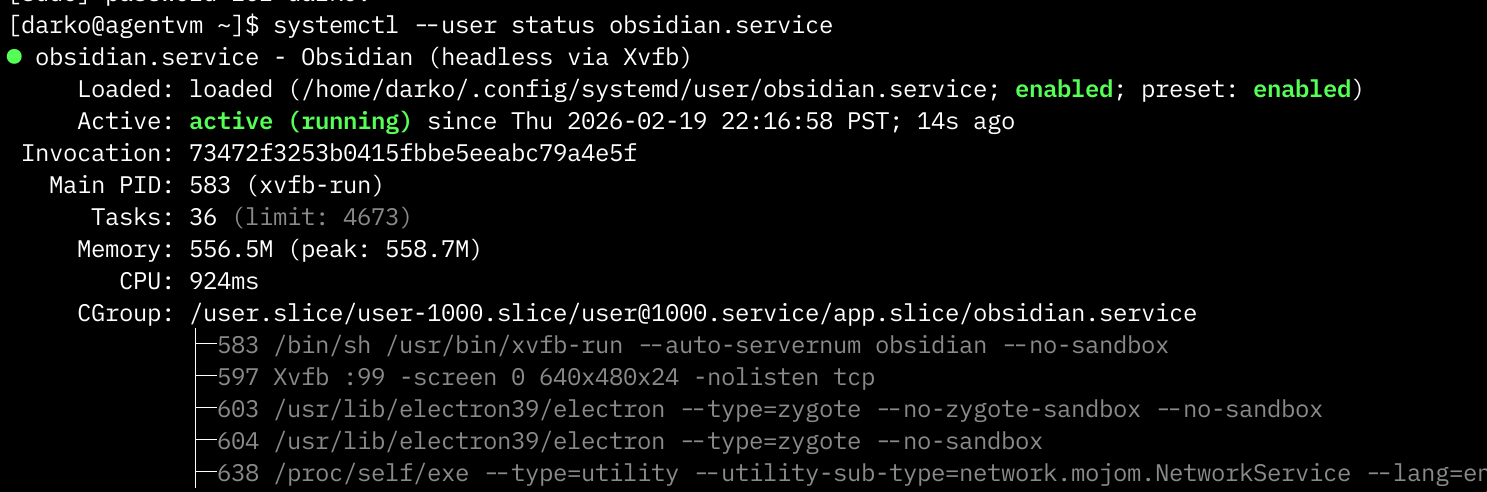
And just like that, we have Obsidian running as a service on a remote headless server. You may choose to run this in your Home Lab, or on an AWS EC2 instance, maybe some VPS Hosting. Or whatever you decide to choose!
Let me bring it back to the first paragraph. Why this? Why would you do this at all? One way to look at this is having something keep a constant locally copy of all your notes, in case your laptop explodes at the same time Obsidian’s servers disappear. In reality, the reason I set this up for myself is because I built that agent.
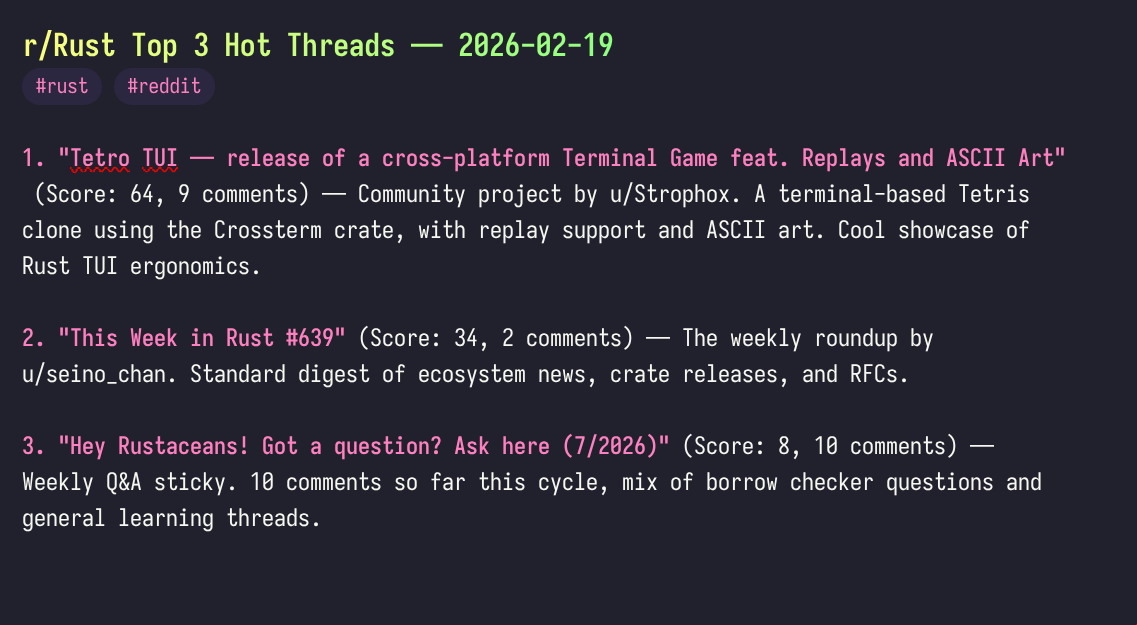
An agent, powered by an LLM, is running daily on my headless server. Using the Reddit MCP it fetches information from some subreddit and summarizes it for me. But for it to be practical, it also uses the Obsidian MCP to store that summary in a daily note.
I am looking forward for the wonderful folks over at Obsidian to make a full version of the obsidian CLI that does not require any GUI. Please Obsidian, make my post irrelevant! 🙏
See you in the next post 👋
