A while back, I’ve built a small command line utility that uploads files to Amazon S3 and makes them shareable. I named it shuk, and it’s just fantastic! I use it on a regular basis to share files with people.
TL;DR: Many clouds support the S3 API. The AWS SDK for Rust works with them too, but you better use
.profile_name()for a full profile load instead of manually cherry-picking credentials and region.
It’s a rather simple Rust 🦀 application using the AWS S3 SDK. Nothing truly special about it. However, I made some minor changes that allow it to be used with other clouds. Yes, other clouds also support the S3 API 🤯
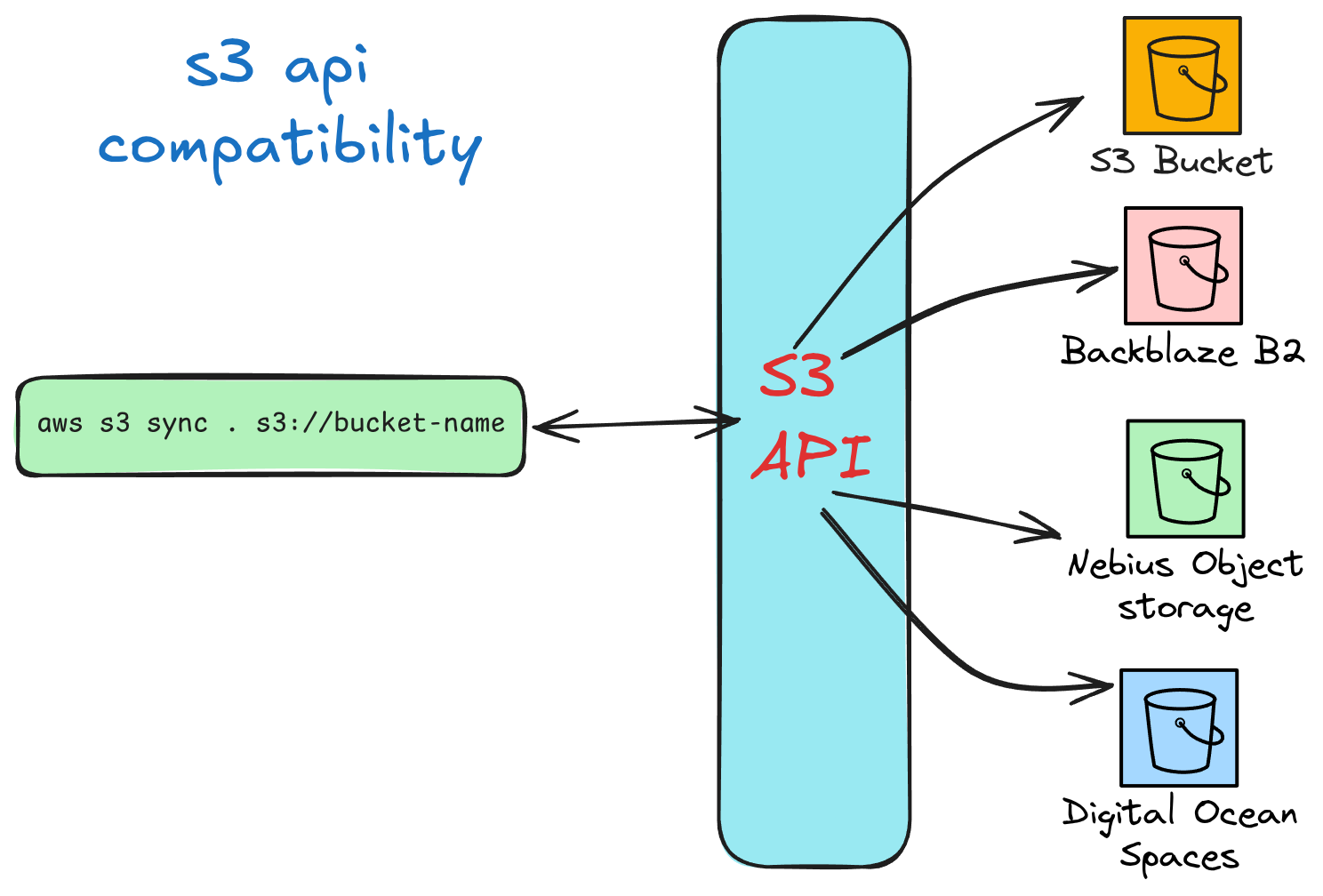
Yes, this has been common for quite a while. So you have cloud providers out there that, to various extents, support the S3 API. Here are some of them:
What does this mean? Well, it’s as simple as using the AWS CLI to interact with object storage on these other clouds. Meaning I can easily run something like this:
aws s3 cp s3://darko-files --profile nebiusAnd upload files using the AWS CLI to the Nebius cloud platform. Amazing.

The AWS CLI is just a very good AWS SDK wrapper, so this means that anything else that uses the AWS SDK. Like, I don’t know… a certain Rust based command line utility that uploads files to S3 buckets. That also works. As long as you are able to pass on a few things. Here is what you need to use with Nebius:
So in essence with the CLI locally, I configured it like so:
aws configure --profile nebius set aws_access_key_id <key_id>
aws configure --profile nebius set aws_secret_access_key <secret_key>
aws configure --profile nebius set region us-central1
aws configure --profile nebius set endpoint_url https://storage.us-central1.nebius.cloud
Yes, I get it, this is just the AWS CLI configuration. However the AWS SDK takes this configuration and applies it to any SDK calls it makes. If you configured it correctly.
Let’s go back to my little shuk uploaded application. The application, as is, could take the parameter of profile. This means, it should work with different clouds, out of the box. Right? Not so fast, I never really counted on making this work for other clouds. So when I ran it with the nebius profile I got something like this:
2026-03-07 22:14:23 [WARN] There was a SDK when checking for file "shared/kiro-student-workshop.pdf" in bucket "darko-shuk"
Error: Could not determine if a the file exists - S3 SDK error: DispatchFailure(DispatchFailure { source: ConnectorError { kind: Io, source: hyper_util::client::legacy::Error(Connect, ConnectError("dns error", Custom { kind: Uncategorized, error: "failed to lookup address information: Name or service not known" })), connection: Unknown } })
========================================
🚀 | Uploading file: kiro-student-workshop.pdf, to S3 Bucket: darko-shuk | 🚀
========================================
Error uploading file: dispatch failure
This was trying to resolve a bucket called darko-shuk.<region>.amazonaws.com. And NOT the bucket in Nebius. This is because it was not actually taking the ENDPOINT_URL. Let’s learn some AWS Rust SDK.
A while back, I wrote about how you can configure the AWS Rust SDK, including setting up credentials, regions, and endpoint URLs. And all I said there was correct, however I wrote shuk before I was any good at writing decent Rust for AWS. Let’s see what I did wrong.
// BAD way to configuring the SDK
pub async fn configure_aws(
    fallback_region: String,
    profile_name: Option<&String>,
) -> aws_config::SdkConfig {
    let profile = profile_name.map(|s| s.as_str()).unwrap_or("default");
    let region_provider = RegionProviderChain::first_try(
        ProfileFileRegionProvider::builder()
            .profile_name(profile)
            .build(),
    )
    .or_else(aws_config::environment::EnvironmentVariableRegionProvider::new())
    .or_else(aws_config::imds::region::ImdsRegionProvider::builder().build())
    .or_else(Region::new(fallback_region));

    let credentials_provider = CredentialsProviderChain::first_try(
        "Environment",
        EnvironmentVariableCredentialsProvider::new(),
    )
    .or_else(
        "Profile",
        ProfileFileCredentialsProvider::builder()
            .profile_name(profile)
            .build(),
    )
    .or_else("IMDS", ImdsCredentialsProvider::builder().build());

    aws_config::defaults(BehaviorVersion::latest())
        .credentials_provider(credentials_provider)
        .region(region_provider)
        .load()
        .await
}
This is a function that would configure the SDK, rather it would return a SdkConfig object. The problem is, I basically cherry-picked specific things out of the AWS profile: Credentials, and Region. But ignored everything else. This is why it was failing, it was just calling the standard AWS SDK Endpoint URL. And for Nebius, that’s not gonna work.
So how did I fix it. Well, basically I handed the entire profile name to the SDK loader by passing .profile_name() and let it do a full profile load. Oh and this made the function way shorter:
// CORRECT way to configuring the SDK
pub async fn configure_aws(
    fallback_region: String,
    profile_name: Option<&String>,
) -> aws_config::SdkConfig {
    let mut loader = aws_config::defaults(BehaviorVersion::latest());

    if let Some(profile) = profile_name.map(|s| s.as_str()) {
        // THIS, this fixed it
        loader = loader.profile_name(profile);
    } else {
        let region_provider = RegionProviderChain::first_try(
            aws_config::environment::EnvironmentVariableRegionProvider::new(),
        )
        .or_else(aws_config::imds::region::ImdsRegionProvider::builder().build())
        .or_else(Region::new(fallback_region));
        loader = loader.region(region_provider);
    }

    loader.load().await
}Please do note, not all features are supported. And I do suggest you check out the documentation of a given cloud to see what features can work. I am safe to say that the Nebius Object Storage supports, both uploads and presigning 🥳
If you wanna check out shuk, it’s available on Github, or even on crates.
If you want to see the AWS SDK for Rust pushed to its limits — downloading 10,000 files concurrently — check out Download and deserialize 10,000 files in 9 seconds.
See you in the next one ✌