I’ve been recording videos and livestreaming for a good (checks calendar), oh god, 6 years now! I can’t believe it’s been that long. Well, that has produced a hefty collection of content. While some of that is over on my YouTube Channel, not everyone (me included) wants to go and rewatch it all. However, I do think there is some good content I can pull away from there. Something that can get me started on a blog post or two. So, the question is: How do I extract information from hours and hours of videos? You transcribe them into text! 👏 Now, this is nothing new, but since the recent AI craze, some really impressive AI models have shown up with the ability to do a real good job in transcribing videos. And I want to, like any good engineer, tinker with them.
Please do note: There are already existing services and tools out there that do exactly this. Stuff like Amazon Transcribe or AssemblyAI. Unless you are looking to build your own pipelines and wrangle SDKs, I suggest you look into those. I on the other hand want to play with Nvidia H200 GPUs and Python orchestration software.
So here is the plan: Upload video to a bucket -> Extract its audio -> Transcribe it -> Store the output as a .txt file back into a bucket. Simple right? Well, let’s complicate stuff. For this, I am choosing to use software and platforms I am not terribly familiar with. So let’s look at Nebius Serverless AI and Prefect workflow orchestration.
First off, let’s talk about Prefect, a Python-native workflow orchestration tool. That takes your native Python code, sprinkles some decorators on functions and produces marvelous workflow orchestration with flows, tasks, retries, logging, scheduling. Oh, and it has a sweet looking dashboard.
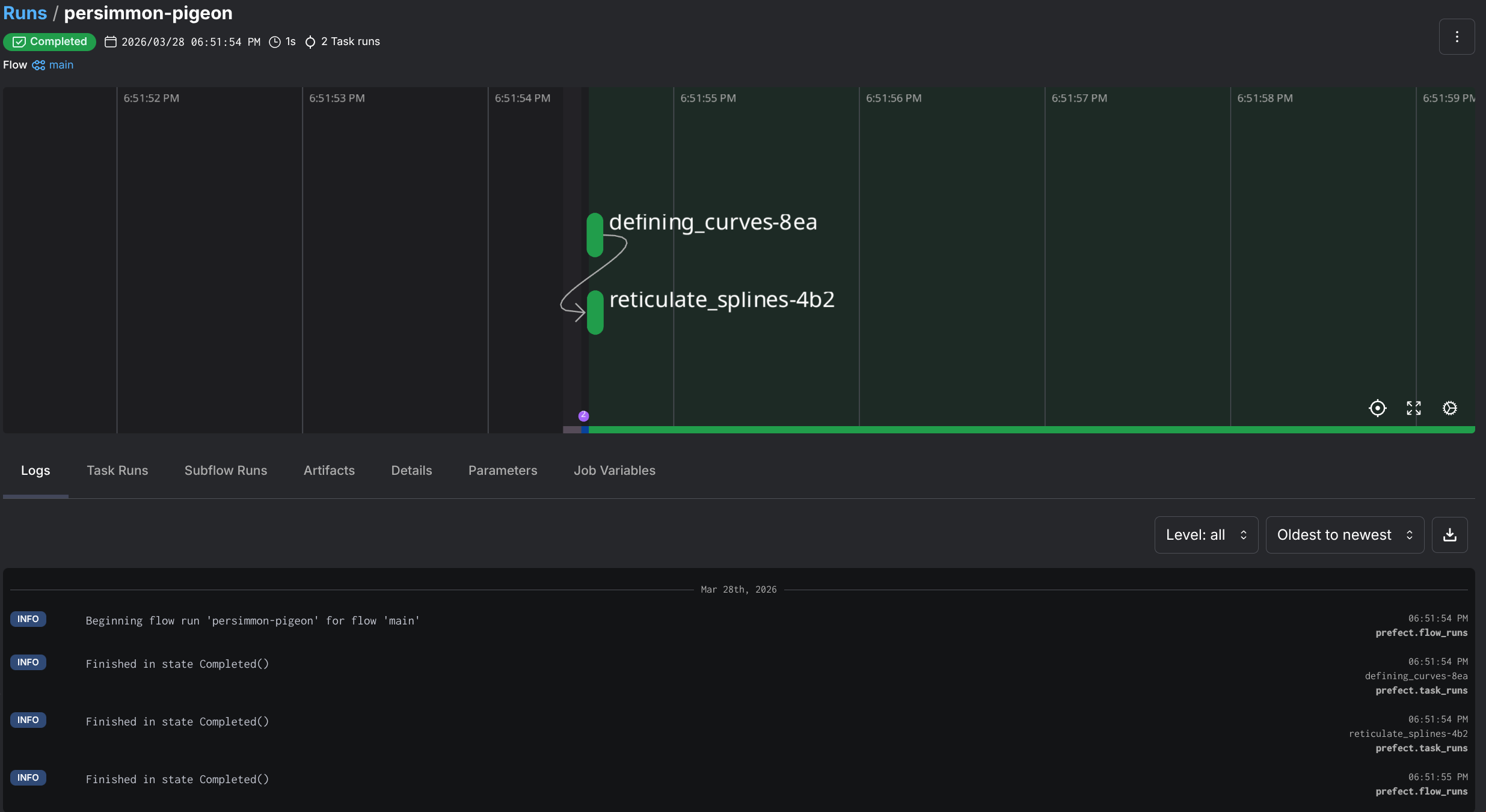
So how does this look like in practice? Let’s look at some sample code that has nothing to do with the actual project but will better illustrate the use of Prefect:
from prefect import flow, task
import random

# The @task decorator converts a function into a task, ie something a flow can trigger
@task
def defining_curves() -> list[float]:
    print("Defining curves...")
    return [random.random() for _ in range(4)]

@task
def reticulate_splines(spline: list[float], n: int) -> list[float]:
    print("Reticulating splines...")
    p0, p1, p2, p3 = spline
    return [((1-t)**3*p0 + 3*(1-t)**2*t*p1 + 3*(1-t)*t**2*p2 + t**3*p3)
        for t in (i/n for i in range(n+1))]

# This is the flow definition, in this case it's the main function, but we can have multiple flows
@flow
def main() -> list[float]:
    # Call the first task
    spline = defining_curves()
    # Call the second one
    results = reticulate_splines(spline, 6)
    return results

if __name__ == "__main__":
    main()
“But Darko …”, You say, ”… why don’t you just use a plain ol’ script for this? Why add another library for something that looks like a Bash script?!”. Well, my dear voice inside my head, it’s because I know the limitations of Bash, and when I should use better tools.
And honestly, I just wanted something that would let me write normal Python functions (no new DSL, YAML), and get retries, logging, and a dashboard for free. This is what Prefect got me. Oh, and if I run this in my homelab, I can use its built-in cron scheduling to schedule execution of flows if I let this run as a service. But I am getting ahead of myself.
Why it matters to me in this context? In order to achieve my goal of video transcribing, I needed to orchestrate a bunch of disconnected things: S3 API operations, job creation, file moves, polling. All things that could go wrong independently. So an orchestration tool like this, does a lot of lifting for me. But let’s actually get to seeing this pipeline and how I set it up.
Here’s how I decided to approach this (diagram below): I am doing this with an inbox model. Meaning that I will drop off the video files in an “inbox” that can later be picked up by the workflow. And for my inbox, I’ve decided to use Nebius’ Object Storage - a S3 API compatible object store (yay for S3 🥳), and I’m gonna use directories (prefixes) to organize stuff:
s3://darko-mesaros-videos/
├── video/              # drop raw videos here (inbox)
│   └── episode.mp4
├── audio/              # extracted audio lands here (inbox)
│   └── episode.mp3
├── DONE_video/         # videos moved here after audio extraction
│   └── episode.mp4
└── DONE_audio/         # audio + transcripts moved here after Whisper
    ├── episode.mp3
    └── episode.txt
What happens here is when a video is picked up from the video/ prefix, audio is extracted and placed in audio/. At the same time the completed video file is placed in DONE_video/. After the transcription has completed, the completed audio file and the transcript is placed into the DONE_audio/ prefix. Simple, huh? Well there are a few processes that happen in between, that make all this happen.
@flowsWhen starting this project out, I began with the idea that I can easy extract the audio locally, and have it uploaded. But that’s just an extra step that can also be orchestrated. So, why not! However, I used the fact that Prefect can execute anything locally and opted to just run ffmpeg in a local container to run this extraction. So, here is the transcription_pipeline flow:
NOTE: This diagram is using functions name that can be found in the code it will make more sense in a bit.
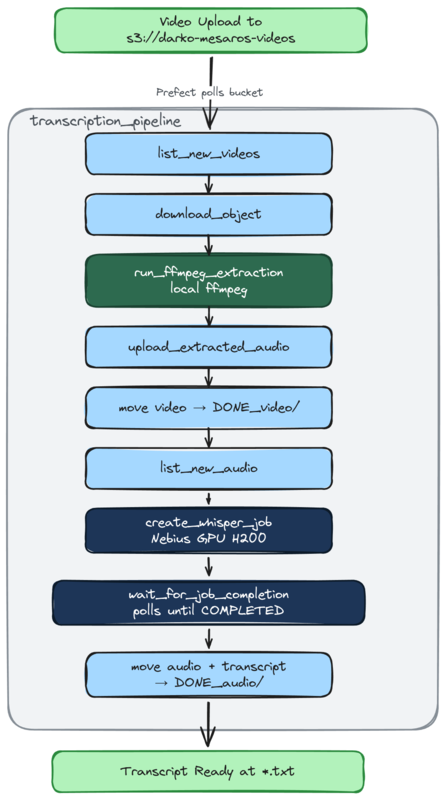
Here is the actual flow code that defines this. I’ll cover some of the functionality of it later in the blog post:
@flow(name="Transcription Pipeline", log_prints=True)
async def transcription_pipeline() -> dict:
    """
    Main local pipeline: detect new files, locally extract audio, launch transcription jobs,
    and move completed files to DONE_ prefixes.

    Returns a summary of what was found and what was processed.
    """
    logger = get_run_logger()

    # Step 1: Check for new videos and extract audio
    new_videos = list_new_videos()
    extracted = []
    for video_key in new_videos:
        paths = build_local_paths(video_key)
        audio_key = video_key_to_audio_key(video_key)
        # DOWNLOAD the video locally
        download_object(video_key, paths["local_video"])
        run_ffmpeg_extraction(paths["local_video"], paths["local_audio"])
        upload_extracted_audio(paths["local_audio"], audio_key)
        move_object(video_key, settings.done_video_prefix)
        extracted.append(audio_key)

    if extracted:
        logger.info(f"Extracted audio from {len(extracted)} videos: {extracted}")

    # Step 2: Check for new audio (includes freshly extracted + previously uploaded)
    new_audio = list_new_audio()

    # Step 3: Launch Whisper jobs for each new audio file
    job_ids = []
    transcripts_moved = []
    for audio_key in new_audio:
        job_id = await create_whisper_job(audio_key)
        job_ids.append(job_id)

        # Wait for the actual container workload to finish before moving files.
        await wait_for_job_completion(job_id)

        transcript_key = f"{audio_key.rsplit('.', 1)[0]}.txt"
        if object_exists(transcript_key):
            move_object(transcript_key, settings.done_audio_prefix)
            transcripts_moved.append(transcript_key)

        move_object(audio_key, settings.done_audio_prefix)

    summary = {
        "new_videos": len(new_videos),
        "audio_extracted": len(extracted),
        "new_audio": len(new_audio),
        "jobs_created": len(job_ids),
        "job_ids": job_ids,
        "transcripts_moved": len(transcripts_moved),
    }

    logger.info(f"Pipeline complete: {summary}")
    return summary
This was a simple way to use my home server and its (rather old) GPU to quickly do this conversion. Quick and painless. One huge downside of this, is that here I every video uploaded to the object storage needs to be downloaded. That is very inefficient, but I did it for a reason, as this could serve situations where video files are uploaded by other people / processes. Okay, downloads are bad, but I can live with that (fiber internet rules). 🔥
However… This is also just running a mixed workload, of partly local partly in the cloud. Let’s look at another flow, aptly named fully_cloud_pipeline
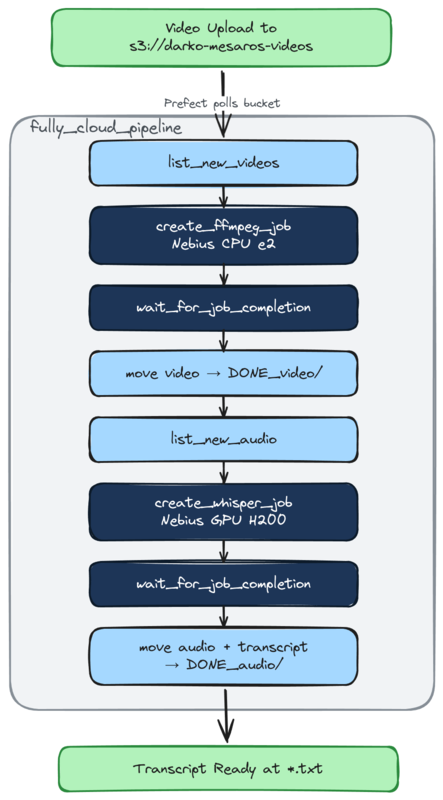
Okay, look at that. We have more jobs! In this flow, instead of downloading the file and running ffmpeg locally to extract the audio. I kick off a serverless job that will extract the audio on already uploaded files. 👏 That’s more cloud native, and I like it.
The flow function code is almost identical except for the fact that we are creating a remote serverless job for the ffmpeg extraction:
# [...]
    ffmpeg_job_ids = []
    for video_key in new_videos:
        # create remote job
        job_id = await create_ffmpeg_job(video_key)
        # Append job id to list for summary
        ffmpeg_job_ids.append(job_id)
        # Wait for the job to complete
        await wait_for_job_completion(job_id)
        move_object(video_key, settings.done_video_prefix)
        extracted.append(video_key_to_audio_key(video_key))
# [...]
Now that we understand the pipelines, and how this all flows. Let’s look at the actual brains behind the operation. These serverless jobs I keep mentioning.
So what are these serverless jobs from Nebius? They are serverless (duh) non-interactive workflows that terminate upon completion or timeout. They are a great way to run stuff that requires a GPU (fine-tuning, simulations, data processing, and batch inference), however if you do not need a GPU there are CPU only options. You basically run a container on some compute and not worry about provisioning and maintaining any of that.
What is neat about these jobs is that they can natively mount object storage buckets as volumes on these containers. Making them (almost) perfect for me to do some video processing and transcription 👏.
Here is how you quickly start a Nebius GPU powered job, with their own CLI, let’s just run nvidia-smi for show:
nebius ai job create \
   --name the-job \
   --image nvidia/cuda:13.1.1-runtime-ubuntu24.04 \
   --volume "storagebucket-exampleID3389:/workspace/data" \
   --container-command bash \
   --args "-c nvidia-smi" \
   --platform gpu-h200-sxm \
   --preset 1gpu-16vcpu-200gb \
   --timeout 1h
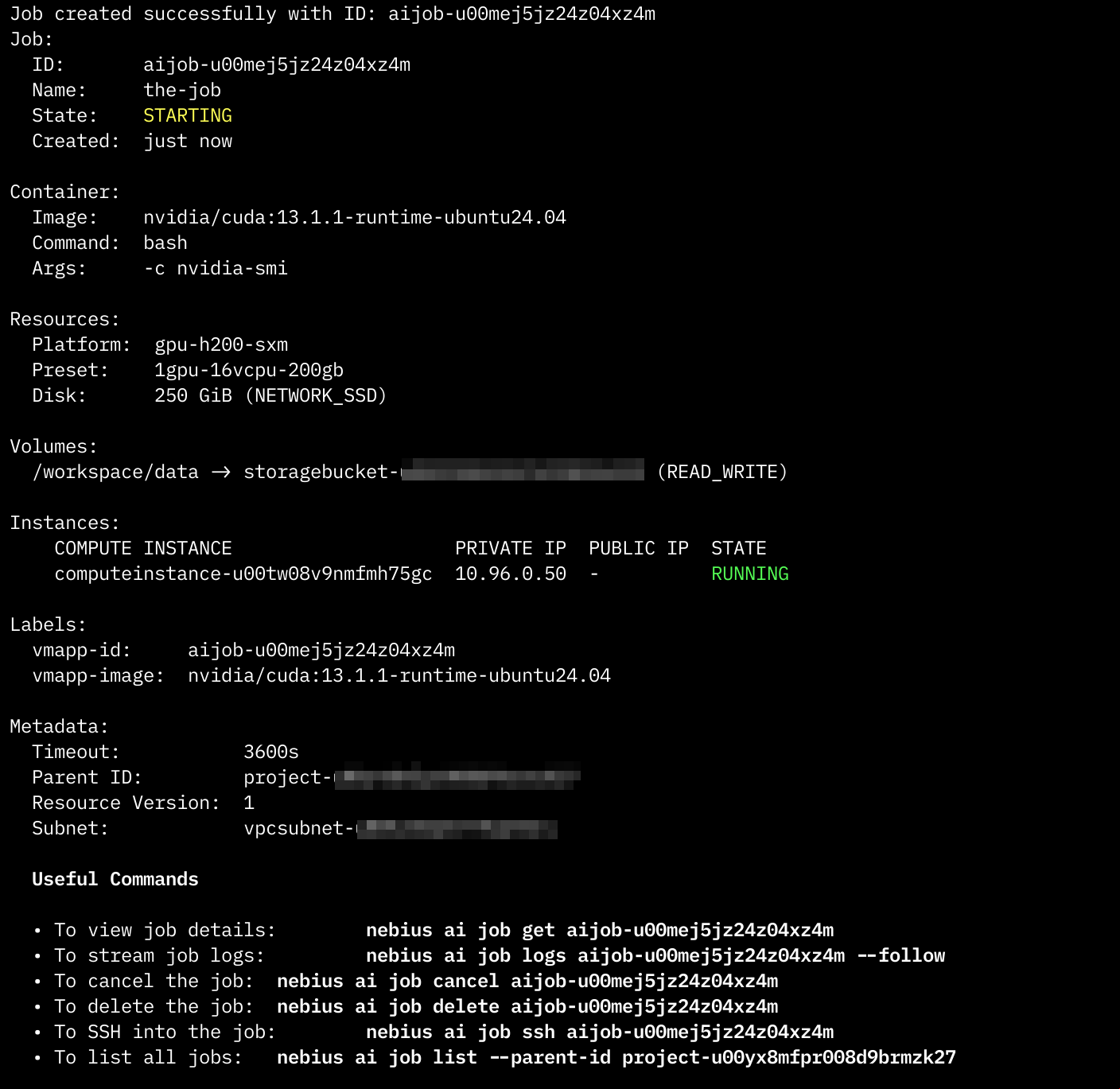
The CLI should produce something like this once it successfully kicks off a job:
Or in the Web interface,the jobs console, like a pending job:

NOTE: If you have run this command, rest assured that the job and the resources will terminate at the completion of the job. In this case it will be instant due to the
nvidia-smicommand exiting. For safety it does have a 1h timeout.
Now, me coming from the world of AWS Lambda, I half expected this to be up and running in less than a couple of milliseconds. Well, no! It will take a couple of minutes for the job to kick off. So while it is in the true sense serverless, it’s not a Lambda Function!
Okay, for my use case I have created two different job types. One has a Nvidia H200 GPU, and the other one does not (we dont really need such a GPU for ffmpeg). And the actual job part of the job, is a container. Okay let’s see what those containers are.
Audio Extraction:
For this one, I am using an off-the-shelf container image for ffmpeg, from the wonderful folks at linuxserver.io. To run this job, I would use something like this:
nebius ai job create \
   --name ffmpeg-episode \
   --image lscr.io/linuxserver/ffmpeg:latest \
   --volume "storagebucket-exampleID3389:/data" \
   --container-command sh \
   --args '-lc "mkdir -p /work /data/audio && ffmpeg -i /data/video/episode.mp4 -vn
-q:a 2 -y /work/episode.mp3 && cp /work/episode.mp3 /data/audio/episode.mp3"' \
   --platform cpu-e2 \
   --preset 2vcpu-8gb \
   --timeout 30m
Basically we are accessing the video file (episode.mp4) and extracting the audio from it at /work/episode.mp3 then copying back the audio to the mounted bucket.
Wait, why the copy? That seems unnecessary. Well, I thought so too. But there is one very interesting quirk about using bucket as volumes. Object storage sucks as volumes/filesystems, yes! Something interesting happens when ffmpeg writes a VBR mp3, it needs to seek back to the beginning of the file at the end to write the Xing header (framecount, file size, seek table). Object storage mounts don’t support that seek-back behavior, so ffmpeg blows up with Error writing trailer: Invalid argument
You can fix this by adding the -write_xing 0 parameter to ffmpeg, in order to avoid moving files. But I wanted the native ffmpeg approach so I’d rather do a bit of a copy.
This issue applies not just to Nebius’ object storage, but even when using S3 Fuse to mount buckets on EC2 instances for example.
Side step over!
Transcription:
To transcribe the video, I wanted to use the Whisper model provided by OpenAI. It’s such a fantastic little thing. It supports many languages (even Serbian), and it seems to perform very very well. So for it, I built my own container image.
The image is basically just the following bit of Python code, wrapped with a Dockerfile:
import sys
from pathlib import Path
from faster_whisper import WhisperModel

audio_path = Path(sys.argv[1])
output_path = audio_path.with_suffix(".txt")

model = WhisperModel(
    sys.argv[2] if len(sys.argv) > 2 else "base",
    device="cuda" if len(sys.argv) > 3 and sys.argv[3] == "cuda" else "cpu",
    compute_type="float16" if len(sys.argv) > 3 and sys.argv[3] == "cuda" else "int8",
)

segments, _ = model.transcribe(str(audio_path))

with open(output_path, "w") as f:
    for segment in segments:
        f.write(segment.text.strip() + "\n")

print(f"Transcript written to {output_path}")
FROM nvidia/cuda:13.1.1-runtime-ubuntu24.04
RUN apt-get update && apt-get install -y python3 python3-venv python3-pip ffmpeg \
&& rm -rf /var/lib/apt/lists/*
# Create and activate venv to avoid PEP 668 externally-managed-environment error
RUN python3 -m venv /opt/venv
ENV PATH="/opt/venv/bin:$PATH"
RUN pip install --no-cache-dir faster-whisper
COPY transcribe.py /transcribe.py
ENTRYPOINT ["python3", "/transcribe.py"]Ultimately this sets up a container with the Whisper model and with that transcribe.py, then I just pass it the path of the audio files. It picks up the files, and does its magic. Thats it.
Like the one before, I can launch this one with the Nebius CLI, but I wont (neither did I launch the audio one). Rather, let me tell you how I did this with the Nebius Python SDK.
Okay so the CLI is great for one-off jobs, but I’m building a pipeline in Python here. So, I need to create jobs from said Python. Enter the Nebius Python SDK.
First thing to understand: Nebius has two API surfaces, and you’ll probably end up using both:
| What | SDK | Why |
|---|---|---|
| AI Jobs, IAM, bucket management | nebius Python SDK | Nebius-native API |
| Object operations (upload, download, list) | boto3 / AWS CLI | S3-compatible API |
So for moving files around in the bucket, it’s good ol’ boto3. For creating and managing jobs, it’s the Nebius SDK.
Here’s what a CreateJobRequest looks like for the Whisper transcription job:
from datetime import timedelta
from nebius.sdk import SDK
from nebius.api.nebius.ai.v1 import CreateJobRequest, JobServiceClient, JobSpec
from nebius.api.nebius.common.v1 import ResourceMetadata
from nebius.api.nebius.compute.v1 import DiskSpec as ComputeDiskSpec

sdk = SDK(credentials=settings.nebius_iam_token)
job_svc = JobServiceClient(sdk)

# Defining the Create Job Request
request = CreateJobRequest(
    # Some basic metadata
    metadata=ResourceMetadata(
        parent_id=settings.nebius_project_id,
        name=f"whisper-{audio_key.split('/')[-1]}",
    ),
    # The actual spec and the details
    spec=JobSpec(
        image="ghcr.io/darko-mesaros/nebius-whisper:latest",
        args=f"/data/{audio_key}",
        platform="gpu-h200-sxm",
        preset="1gpu-16vcpu-200gb",
        subnet_id=settings.nebius_subnet_id,
        timeout=timedelta(minutes=30),
        disk=JobSpec.DiskSpec(
            type=ComputeDiskSpec.DiskType.NETWORK_SSD,
            size_bytes=250 * 1024 * 1024 * 1024,
        ),
        volumes=[
            JobSpec.VolumeMount(
                source=settings.nebius_bucket_id,
                container_path="/data",
                mode=JobSpec.VolumeMount.Mode.READ_WRITE,
            ),
        ],
    ),
)

operation = await job_svc.create(request)
await operation.wait()
job_id = operation.resource_id
Looks reasonable, right? Well, getting to this point involved a lot of trial and error. Let me save you some time with the gotchas I ran into:
spec.disk is required - the UI doesn’t make this obvious, but the API will reject your request without it. And you need both disk.type and disk.size_bytes, not just one.JobSpec.DiskSpec is the container, but the actual type enum (NETWORK_SSD) comes from nebius.api.nebius.compute.v1. That’s the compute namespace, not the AI namespace. Subtle and easy to miss.source wants the bucket’s internal ID. You can grab it with: nebius storage bucket get-by-name --name my-bucket --format json | jq -r '.metadata.id'args is a single string, not a list - unlike what you might expect from Docker semantics.None of these are hard problems, but they’re the kind of thing that eats an afternoon when the error messages are just request IDs. Looking at you Nebius 👀
Alright, this is the section where I save you from the bug that cost me an embarrassing amount of time. 🫠
Look at the last three lines of the code above:
operation = await job_svc.create(CreateJobRequest(...))
await operation.wait()
job_id = operation.resource_id
# 🚨 The job RESOURCE exists, but the container is still running!
See, operation.wait() means the job resource was created as in, Nebius knows about it, it’s in the system, it has an ID. But the actual container? The one doing the transcription? Still chugging along on that H200. If you move your output files right after this point (like I did), you’ll be moving… nothing. Because the transcript hasn’t been written yet.
This is a two-wait problem:
operation.wait()) the job existsThe fix? A polling loop that checks the actual job state:
_TERMINAL_STATES = {
    JobStatus.State.COMPLETED,
    JobStatus.State.FAILED,
    JobStatus.State.CANCELLED,
    JobStatus.State.ERROR,
}

async def wait_for_job_completion(job_id: str, poll_seconds: int = 15, max_polls: int = 120):
    for _ in range(max_polls):
        status = await get_job_status.fn(job_id)
        state = status["state"]
        if status["done"]:
            if state != JobStatus.State.COMPLETED.name:
                raise RuntimeError(f"Job {job_id} finished unsuccessfully: {state}")
            return status
        await asyncio.sleep(poll_seconds)
    raise TimeoutError(f"Job {job_id} didn't finish in time")
Nothing fancy, just poll job_svc.get(), check if the state is terminal, sleep, repeat. But without this, the pipeline was happily moving empty prefixes around and reporting success. The kind of bug where everything looks fine until you try to open the transcript file and find out it doesn’t exist. 😅
If you’re coming from AWS Lambda land like me, this mental model shift is important. Lambda gives you a response when the function is done. Here, job creation and job completion are two completely separate events. Respect the two waits.
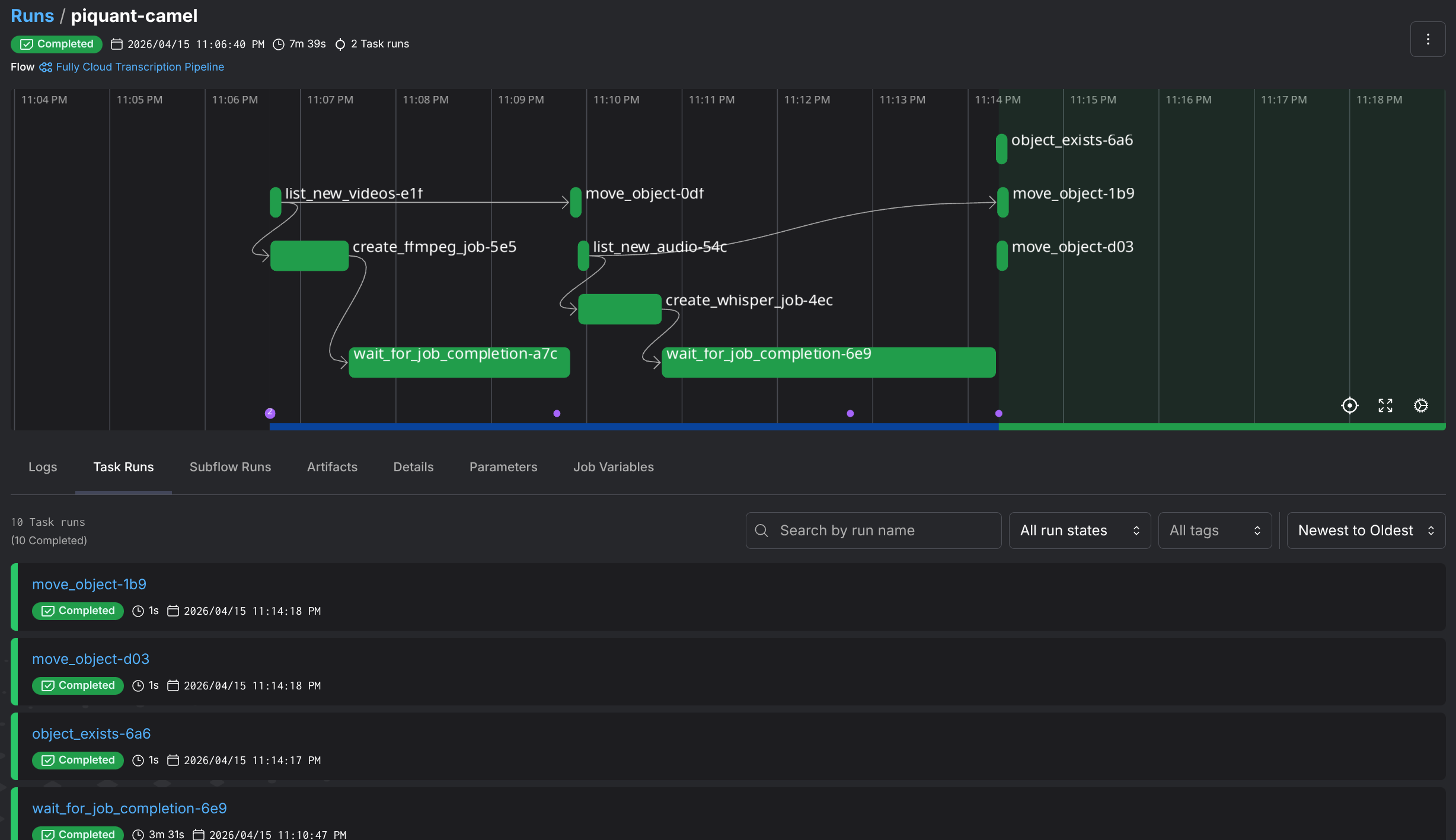
So there you have it, a video transcription pipeline that takes MP4s from a bucket, extracts audio (either locally or in the cloud), runs Whisper on H200 GPUs, and drops transcripts back into object storage. All orchestrated with Prefect, all talking to Nebius through a mix of their Python SDK and good ol’ boto3.
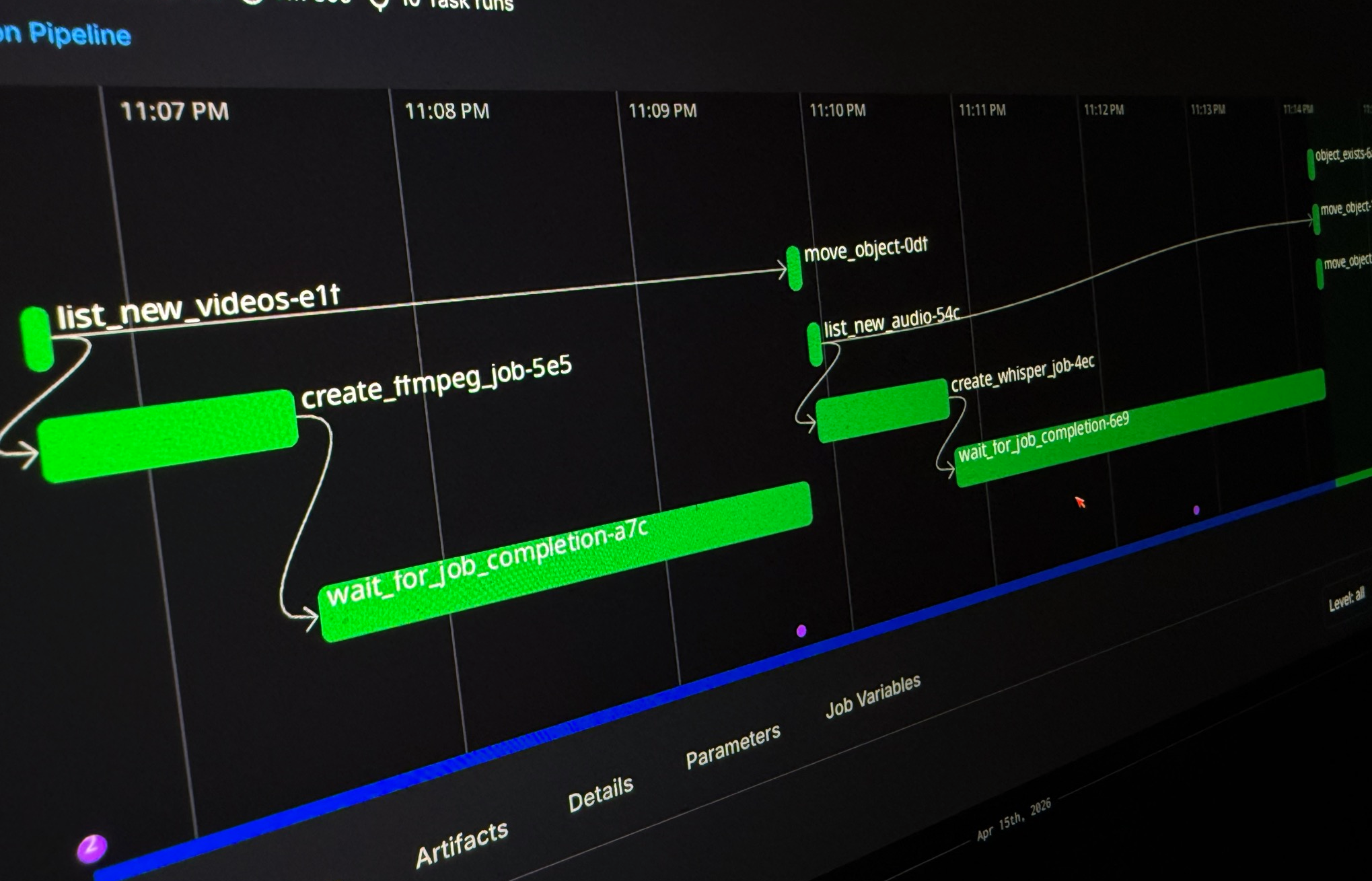
Just look at this gorgeous pipeline:
Was it the most efficient way to transcribe some videos? Absolutely not. I could’ve just used an existing transcription service and been done in 10 minutes. But that’s not the point, is it? I got to tinker with GPU serverless jobs.
If you want to poke around the code, it’s all up on GitHub. Fair warning: it’s very much a “works on my machine” situation, but the patterns are all there, and you should be able to run it.
There is a .env example file included as well as a justfile for your convenience. Just make sure you have both the nebius CLI setup (and the token), as well as some of the bucket/infrastructure plumbing setup
A few things I’d do differently next time:
Until the next one! ✌